Skip to content
View in the app

A better way to browse. Learn more.

Armbian Community Forums

A full-screen app on your home screen with push notifications, badges and more.

To install this app on iOS and iPadOS
  1. Tap the Share icon in Safari
  2. Scroll the menu and tap Add to Home Screen.
  3. Tap Add in the top-right corner.
To install this app on Android
  1. Tap the 3-dot menu (⋮) in the top-right corner of the browser.
  2. Tap Add to Home screen or Install app.
  3. Confirm by tapping Install.

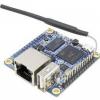
OrangePi Lite - Enable boot output to serial
Featured Replies

Hi,


I have connected Orange Pi Lite over serial UART, but looks like the default settings are to not output the boot log to serial. You can only see U-Boot messages, then "Uncompressing Linux kernel" and after some time the login prompt comes.


What exactly do I need to change/configure to get the classic kernel boot log to serial console?


Quote

$ cat /proc/cmdline
root=UUID=b5b787c1-ea46-43ab-9140-7e7440f6d48a rootwait rootfstype=ext4 console=ttyS0,115200 console=tty1 hdmi.audio=EDID:0 disp.screen0_output_mode=1920x1080p60 consoleblank=0 loglevel=1 ubootpart=71a680ab-01 ubootsource=mmc usb-storage.quirks=0x2537:0x1066:u,0x2537:0x1068:u   sunxi_ve_mem_reserve=0 sunxi_g2d_mem_reserve=0 sunxi_fb_mem_reserve=16 cgroup_enable=memory swapaccount=1

Quote

$ uname -a
Linux orangepilite 5.4.45-sunxi #20.05.4 SMP Sun Jun 14 21:46:20 CEST 2020 armv7l armv7l armv7l GNU/Linux


Thanks

Guest
This topic is now closed to further replies.

Account

Navigation

Search

Search

Configure browser push notifications

Chrome (Android)
  1. Tap the lock icon next to the address bar.
  2. Tap Permissions → Notifications.
  3. Adjust your preference.
Chrome (Desktop)
  1. Click the padlock icon in the address bar.
  2. Select Site settings.
  3. Find Notifications and adjust your preference.